


 Github Stars:
 Last Commit:
  Created:



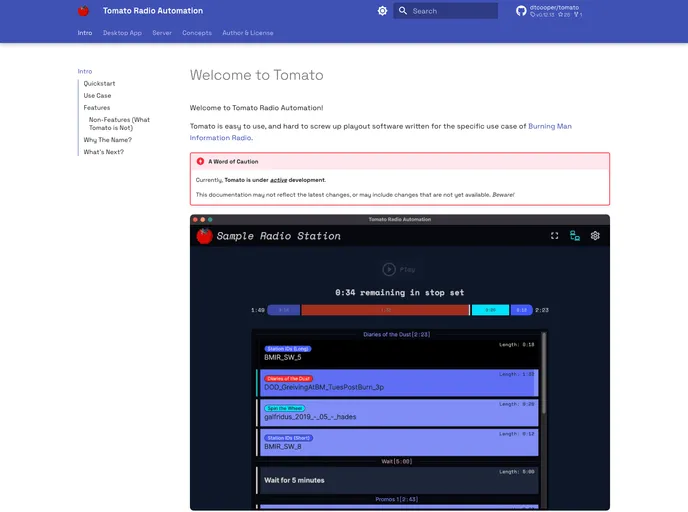
Overview:
The Tomato Radio Automation software is a client-server solution designed specifically for the use case of Burning Man Information Radio. The backend server is built with Python’s Django web framework and utilizes its automatic admin interface. The desktop app is a native, cross-platform Svelte + Electron app that communicates with the backend via websockets and supports intermittent connectivity loss.
Features:
- Easy to use playout software: Tomato is designed to be user-friendly and difficult to make mistakes with.
- Backend server in Django: The server is built using Python’s Django web framework, providing a robust and scalable backend infrastructure.
- Cross-platform desktop app: The desktop app is built using Svelte and Electron, ensuring compatibility with multiple operating systems.
- WebSocket communication: The app communicates with the backend server via websockets, enabling real-time updates and notifications.
- Intermittent connectivity support: The app supports intermittent connectivity loss, ensuring uninterrupted playout even in challenging network conditions.
Installation:
To install the server in both development and production environments, follow the detailed instructions provided in the documentation. Here are the basic steps:
- Install Python 3.9 or higher.
- Clone the repository from here.
- Navigate to the server directory.
- Install the required Python libraries using pip.
- Configure the database and other necessary settings.
- Run the server using the provided command.
To run the desktop app locally, either download a development preview build from here or follow the instructions provided in the documentation.
To run the documentation locally, install Python 3.9 or higher and then follow these steps:
- Open your terminal.
- Navigate to the documentation directory.
- Run the command:
mkdocs serve. - Access the documentation in your web browser at http://localhost:8888/
Summary:
The Tomato Radio Automation software provides an easy-to-use and reliable solution for Burning Man Information Radio. With its Django backend and Svelte + Electron desktop app, it offers scalability, cross-platform compatibility, and real-time communication capabilities. The ability to handle intermittent connectivity loss ensures uninterrupted playout, making it a suitable choice for challenging network conditions.































































