


 Github Stars:
 Last Commit:
  Created:


Overview:
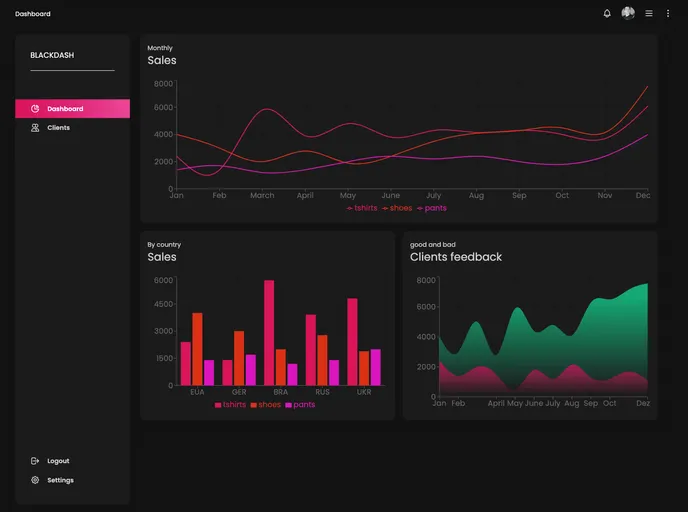
The Elegant Dark Themed Dashboard is a visually appealing and user-friendly dashboard that incorporates tables and charts. It has been developed using a combination of StackNext JS, TypeScript, Tailwind CSS, Framer Motion, React tables, and Recharts. This dashboard offers a sleek and professional design, making data visualization and management effortless and aesthetically pleasing.
Features:
- Dark Theme: The dashboard comes with an elegant dark theme that enhances user experience and readability.
- Tables: The dashboard includes interactive and customizable tables, allowing users to efficiently analyze and manage data.
- Charts: With the integration of Recharts, the dashboard provides visually appealing and dynamic charts for data visualization and analysis.
Installation:
To install and set up the Elegant Dark Themed Dashboard, follow these steps:
Clone the project repository from Git using the following command:
git clone <repository_url>Navigate to the project directory:
cd <project_directory>Install the required dependencies using npm or yarn:
npm installor
yarn installStart the development server:
npm run devor
yarn devAccess the dashboard in your browser by navigating to the provided localhost URL.
Summary:
The Elegant Dark Themed Dashboard is a feature-rich and visually appealing dashboard that offers an elegant dark theme for improved user experience. With interactive tables and dynamic charts, it provides a convenient way to analyze and manage data. The dashboard is easy to install and set up, making it a suitable choice for users looking for a professional and efficient data visualization solution.


































































