


 Github Stars:
 Last Commit:
  Created:

Overview:
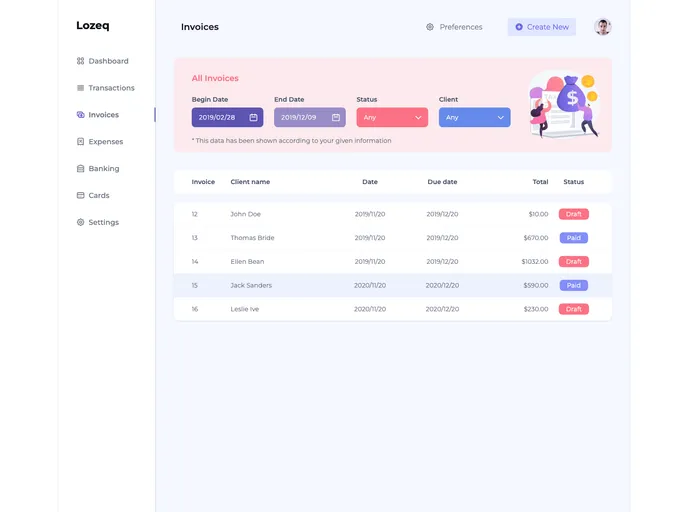
The Tailwindcss Invoice Dashboard Template is a responsive invoice management dashboard designed using the Tailwindcss framework. It provides a user-friendly interface for managing invoices efficiently.
Features:
- Responsive Design: The invoice dashboard template is designed to provide a seamless experience across different devices and screen sizes.
- Invoice Management: Users can easily manage and organize their invoices within the dashboard, making it convenient to track payments and outstanding balances.
- Tailwindcss Integration: The template utilizes the power of the Tailwindcss framework, offering a wide range of utility classes for customizing the dashboard’s appearance.
Installation:
To install and use the Tailwindcss Invoice Dashboard Template, follow these steps:
- Make sure you have Node.js installed on your local machine.
- Open your command line and navigate to the project directory.
- Run the following command to install the required dependencies using npm:
npm install - Once the dependencies are installed, you can start the development server by running the following command:
npm run dev - This will launch the development server, and you can access the dashboard template through your browser at the provided local development URL.
Summary:
The Tailwindcss Invoice Dashboard Template is an efficient solution for managing invoices. With its responsive design and seamless integration with Tailwindcss, users can easily track and organize their invoices in a visually pleasing dashboard. Installation is straightforward, requiring the installation of Node.js and the use of npm to install dependencies. Overall, this template provides a convenient and user-friendly experience for invoice management.



































































