


 Github Stars:
 Last Commit:
  Created:

Overview:
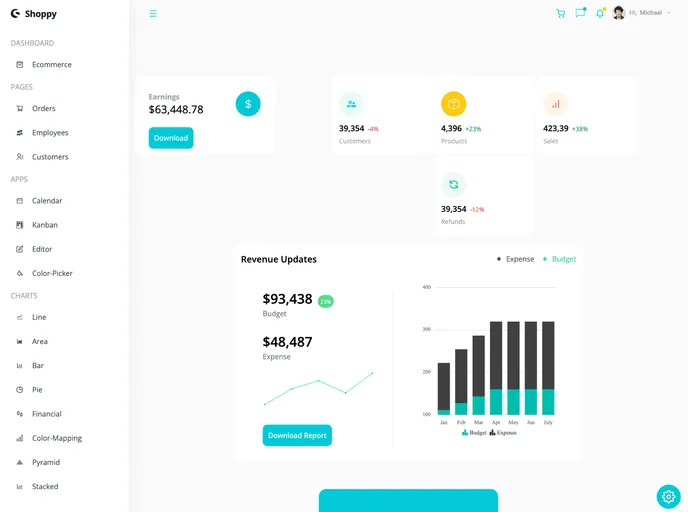
The React Admin Dashboard is a web application built using advanced JavaScript concepts, React, and Tailwind CSS. It provides a comprehensive and intuitive user experience for managing and tracking data. The combination of React’s powerful UI building capabilities and Tailwind CSS’s pre-defined classes allows for easy styling and customization. With features like light and dark mode, theme color options, and beautiful graphs, the dashboard offers a visually pleasing and responsive interface.
Features:
- Light and Dark Mode: The dashboard offers the option to toggle between light and dark mode, based on user preferences.
- Theme Color Options: Users can choose from a variety of theme color options to customize the dashboard’s appearance.
- Responsive: The dashboard is designed to be responsive, adapting to different screen sizes and devices.
- Beautiful UI: The user interface of the dashboard is visually appealing and well-designed.
- Beautiful Graphs created using Syncfusion: The dashboard incorporates beautiful graph visualizations created using the Syncfusion library.
Installation:
To install and run the React Admin Dashboard on your local machine, follow these steps:
- Make sure you have Node.js and npm (Node Package Manager) installed on your computer.
- Clone the repository to your local machine.
- Navigate to the project directory.
- Install the necessary dependencies by running the command
npm installin your terminal. - Start the development server by running the command
npm startin your terminal. - The dashboard should now be up and running on http://localhost:3000.
Summary:
The React Admin Dashboard is a feature-rich web application built using React, Tailwind CSS, and Syncfusion. It offers a comprehensive and intuitive user experience for managing and tracking data. With its responsive design, light and dark mode options, and beautiful UI, the dashboard provides a visually pleasing and engaging interface. To install and run the dashboard on your local machine, follow the provided installation guide.



































































