


 Github Stars:
 Last Commit:
  Created:
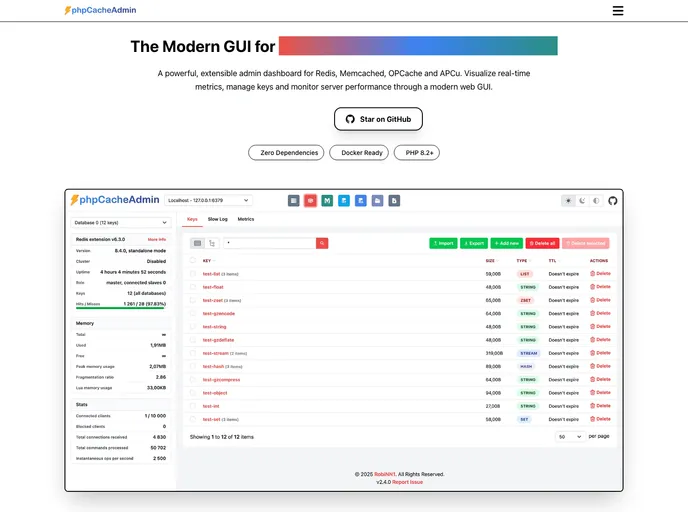
Overview
The Visitor Badge is a theme that allows users to create and customize visitor badges for events or organizations. It provides an easy-to-use interface for managing visitor information and generating badges. The theme can be customized through a configuration file and supports integration with Redis and Memcached for improved performance.
Features
- Easy installation and setup
- Customizable configuration file
- Support for Redis and Memcached integration
- Ability to add multiple servers for scalability
- Compatible with PHP 7.4 or higher
- Support for Redis server version 3.0.0 or higher
- Support for Memcached server version 1.4.31 or higher
- Customizable dashboards
- Includes testing with PHPUnit and PHPStan
- Supports Tailwind CSS compilation
Installation
To install the Visitor Badge theme, follow these steps:
- Extract the content of the theme.
- If using the default settings, the theme should work out of the box.
- To customize the configuration file, copy
config.dist.phpintoconfig.phpand make your changes there. - It is highly recommended to run
composer installbefore using the theme. - To update the theme, replace all files and delete the
tmpfolder (which contains only compiled Twig templates). - If using Docker, you can find the container at https://hub.docker.com/r/robinn/phpcacheadmin. Use the provided command or include it in your
docker-compose.ymlfile. - For Redis integration, set the required environment variables. These include the server name, host, port, scheme, SSL options, database, username, password, authentication file, path, number of databases, and scan size.
- For Memcached integration, set the required environment variables. These include the server name, host, port, and path.
- To add another server, add the same environment variables but change the index number in the variable names.
- Ensure that the following requirements are met: PHP version 7.4 or higher, Redis, Memcached, Opcache or APCu PHP extensions, and Redis server version 3.0.0 or higher.
- If the Redis extension is not installed, the theme will use a Predis client. Install Predis manually via composer require predis/predis if using Composer.
- If the Memcache(d) extension is not installed, the theme will use a custom PHPMem client.
- For better performance, always use the recommended extensions.
- To compile Tailwind CSS, run
npm installand then eithernpm run buildornpm run watchfor auto-compiling.
Summary
The Visitor Badge theme is a versatile and customizable solution for managing visitor badges. With easy installation, support for Redis and Memcached integration, and compatibility with PHP 7.4 or higher, it offers a user-friendly interface for creating and managing badges. Additionally, the theme includes features such as customizable dashboards, testing with PHPUnit and PHPStan, and support for Tailwind CSS compilation. Overall, the Visitor Badge theme provides a comprehensive solution for managing visitor badges in an efficient and customizable way.



































































